iOS 27 Is Here! 15+ Exciting New Features, Smarter Siri AI & Supported iPhones
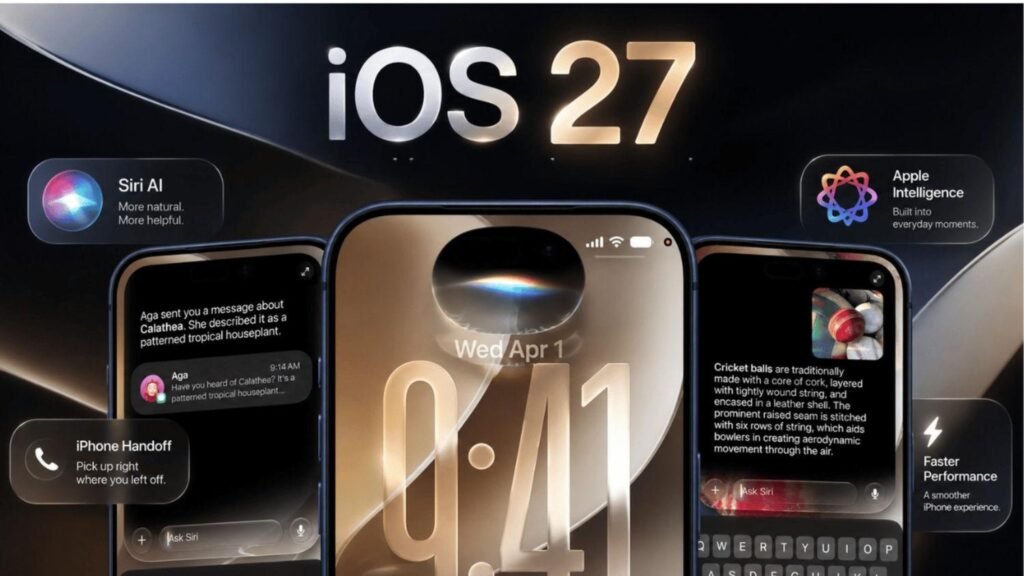
Apple continues to change the way people use their smartphones, and iOS 27 is another important step in that direction. The latest iPhone software update brings a stronger focus on artificial intelligence, improved personal assistance, photography tools, privacy, and everyday convenience.
For years, Apple has introduced new features that make the iPhone easier to use. However, iOS 27 takes a slightly different approach. Instead of focusing only on visual changes, Apple has put considerable attention into making the iPhone more intelligent and helpful in everyday situations.
One of the biggest highlights is the new Siri AI experience. It is designed to understand natural language, remember useful personal context, answer more complicated questions, and help users complete tasks across different applications. Apple has also improved the Photos app, Safari, parental controls, accessibility features, and overall system performance.
Another interesting thing about iOS 27 is that it is not limited to Apple’s newest iPhones. Several older devices are also compatible with the update, although some advanced artificial intelligence features require newer hardware.
Whether you are thinking about updating your iPhone or simply want to understand what’s new, this guide covers the important details of iOS 27, including its features, compatibility, release information, and practical benefits.
When Was iOS 27 Released?
Apple officially released iOS 27 on September 14, 2026. The update became available as a free software upgrade for compatible iPhone models.
Before the public release, Apple provided developer and public beta versions so developers and interested users could test the software and report problems.
The final release introduced several major improvements, particularly in Apple Intelligence and Siri. It also included updates to the design, Photos, Safari, Messages, and system settings.
Apple has continued improving the operating system through smaller updates. The iOS 27.2.1 release, for example, includes bug fixes and security improvements.
Users can check for the latest version by opening:
Settings → General → Software Update
It is a good idea to install the latest available version rather than staying on an older release. Software updates often include important security fixes that help protect personal information.
What’s New in iOS 27?
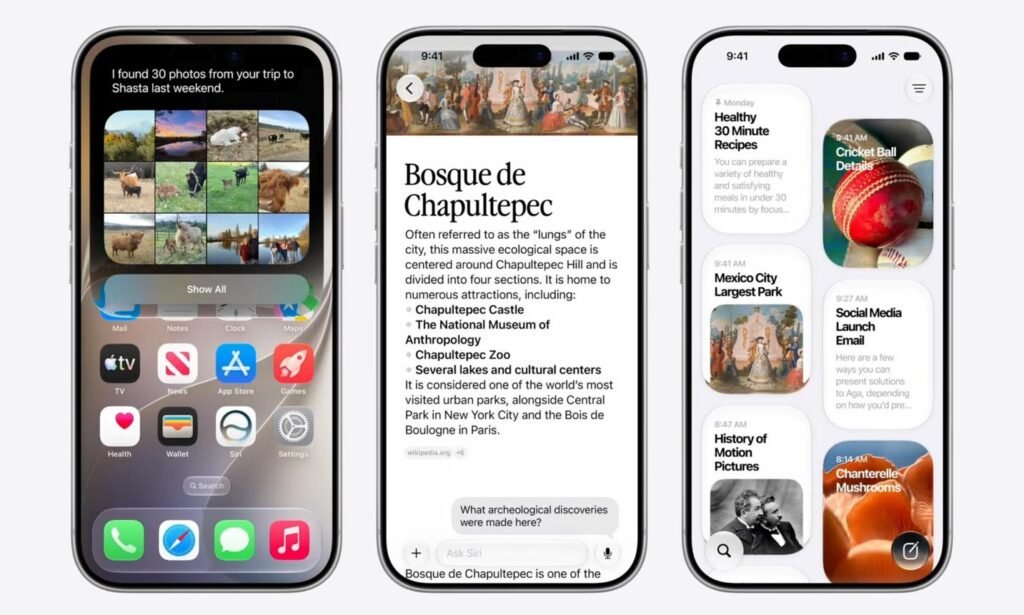
iOS 27 introduces improvements across several parts of the iPhone experience. Some changes are immediately noticeable, while others work quietly in the background.
Here are the most important additions.
1. A Smarter Siri AI Experience
The biggest headline feature in iOS 27 is the next generation of Siri.
Apple has been working toward making Siri more useful in everyday situations, and this update introduces a more conversational assistant with improved understanding and broader capabilities.
Traditional voice assistants often struggle when users ask complicated questions or provide instructions with multiple steps. Siri AI aims to make those interactions feel more natural.
For example, you can ask Siri to help find information in your messages, locate a particular photograph, draft an email, or understand something currently displayed on your screen.
Instead of treating every request as an isolated command, Siri AI can use relevant personal context to provide more useful answers.
The assistant can also help users write messages, summarize information, and perform actions across supported applications.
This makes Siri more than a simple tool for setting alarms or checking the weather. It becomes a more capable assistant that can help with everyday activities.
However, availability depends on the iPhone model, language, region, and software version. Siri AI is also identified as a beta feature, so its capabilities may continue to evolve.
2. A Dedicated Siri App
Another significant change is the introduction of a dedicated Siri application.
Previously, interacting with Siri generally meant activating the assistant through a voice command, button, or other system control.
With iOS 27, users can access a dedicated place for their conversations.
This makes it easier to revisit earlier discussions, continue an existing conversation, or start a new one.
Imagine asking Siri to help plan a holiday. You might discuss destinations one day and return later to ask about travel arrangements. Having a dedicated conversation history makes that experience more convenient.
The application also brings a more familiar conversational interface to Apple’s assistant.
For people who regularly use AI tools, this is a meaningful improvement because it makes interactions feel less like individual voice commands and more like ongoing conversations.
3. Write With Siri
Writing is another area where Apple Intelligence has become more useful.
The new Write with Siri functionality allows users to create drafts, improve existing text, and request feedback using natural language.
For example, you could ask Siri to:
- Write a professional email.
- Make a message sound more polite.
- Correct grammar and spelling.
- Rewrite a paragraph in a friendly tone.
- Summarize a longer piece of information.
- Create a first draft for a document.
Siri can also personalize writing in Messages and Mail by considering the user’s previous writing style, including familiar expressions and punctuation.
This could be especially helpful for people who regularly communicate through their iPhones for work, education, and personal matters.
Rather than switching between different applications, users can access writing assistance directly within supported experiences.
It is worth remembering that AI-generated writing should still be reviewed before sending, especially when the message contains important details.
4. Siri Mode in the Camera App
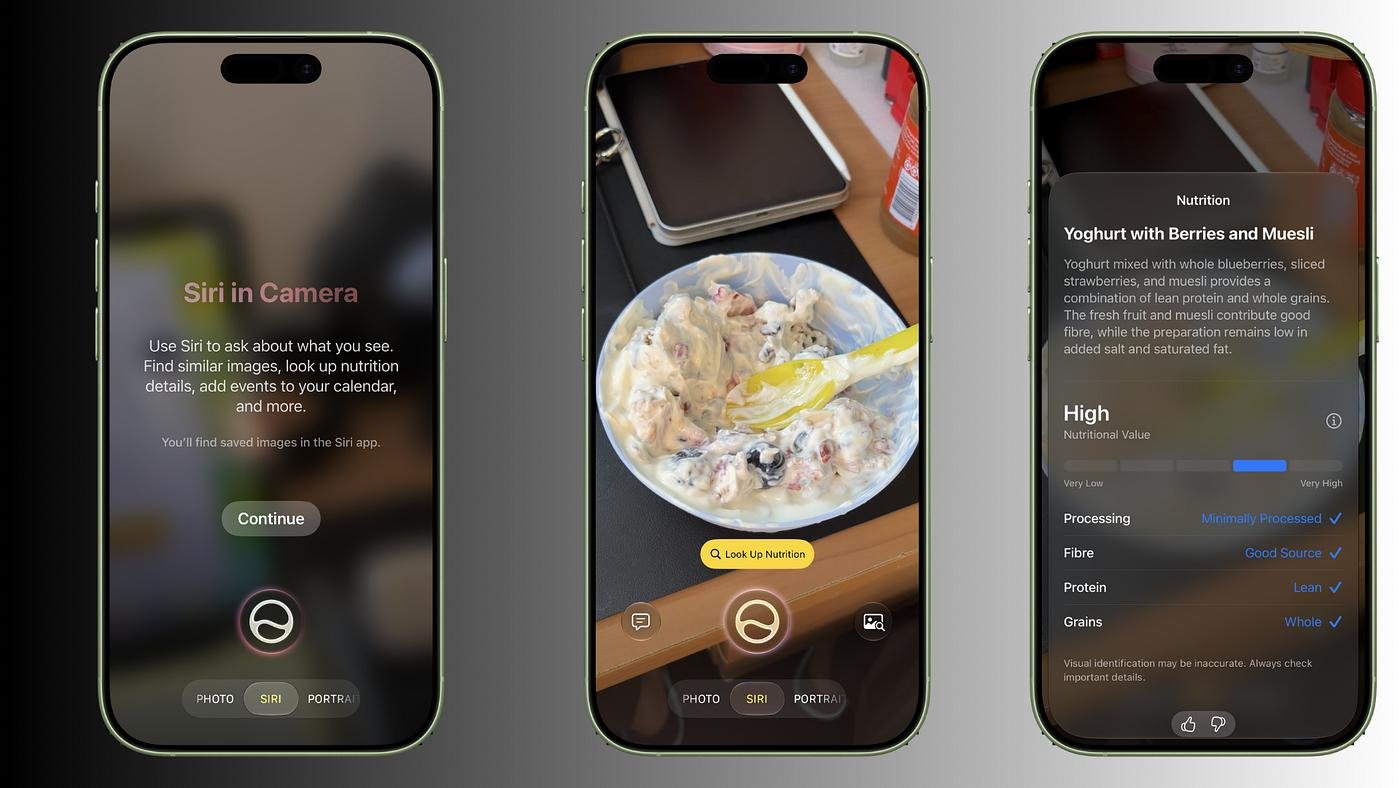
One of the more interesting additions is Siri integration directly into the Camera app.
This feature combines the camera experience with Visual Intelligence, allowing users to learn more about objects, products, food, and other things around them.
For example, imagine visiting a restaurant and seeing a dish you have never tried. You can point your iPhone camera toward it and ask Siri what it is or request information about its ingredients.
Other possible uses include identifying objects, finding similar products, understanding information, and taking actions based on what the camera sees.
This is particularly useful because it reduces the number of steps required to find information.
Instead of taking a photograph, opening a browser, and manually searching for an answer, users can begin with the camera itself.
The feature is also useful when shopping. If you see an interesting product, Visual Intelligence can help you find similar items or learn more about what you are looking at.
5. Improved Photo Editing Tools
Photography has always been an important part of the iPhone experience. With iOS 27, Apple has introduced more intelligent editing tools designed to make photo improvements easier.
The Photos app now includes three particularly interesting tools: Spatial Reframing, Extend, and an upgraded Clean Up feature.
Spatial Reframing
This tool allows users to adjust the composition of an existing photograph after taking it. It uses spatial information to create the impression of changing the camera’s position.
It can be useful when a photograph does not have quite the right framing.
Extend
Sometimes a photograph looks great, but the framing feels too tight. The Extend tool can generate additional image content beyond the original edges.
For example, you might want more space around a person or need a wider image for a social media post.
Improved Clean Up
The Clean Up tool has also received improvements. It can remove larger unwanted objects and distractions from photographs with more advanced processing.
These tools make the Photos app more useful for everyday editing without requiring users to install additional applications.
However, AI editing is not always perfect. Complicated backgrounds, reflections, and detailed objects can sometimes produce unnatural results. It is still worth checking edited photographs before sharing them.
6. Image Playground Gets Better
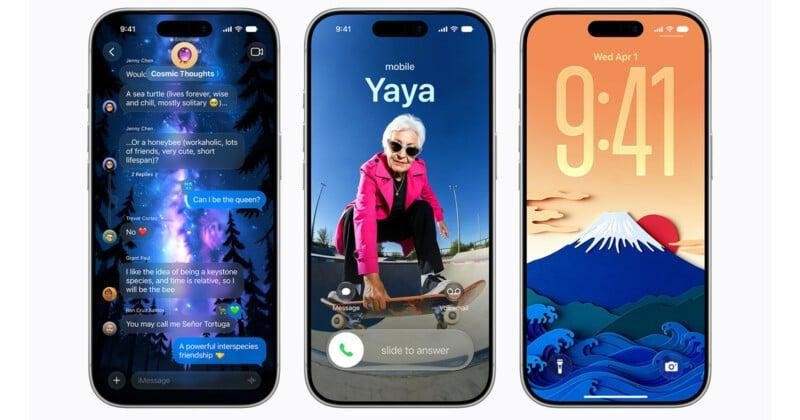
Apple has also improved Image Playground, its built-in creative image generation experience.
The updated version supports a wider range of visual styles, including more realistic-looking images.
Users can create images through descriptions and modify existing creations using natural language.
For example, you might describe a particular scene, request a different artistic style, or make changes to an image without manually adjusting every detail.
This makes the feature useful for people who enjoy creating personalized wallpapers, contact posters, and other visual content.
The updated experience also makes it easier to experiment with different ideas.
As with other generative AI features, the results can vary depending on the description and the complexity of the requested image.
7. Safari Gets Smarter With AI
Safari is another application receiving meaningful improvements in iOS 27.
One particularly useful addition is the ability to automatically organize browser tabs by topic.
Many people keep dozens of tabs open throughout the day. Finding a specific webpage can become frustrating, especially when different subjects are mixed together.
Safari’s Organize by Topic feature uses Apple Intelligence to group related pages automatically.
For example, tabs about shopping, travel, education, and work can be organized into more meaningful groups.
Another interesting addition is Notify Me.
This feature can periodically monitor supported webpages and notify users when something changes.
Imagine checking an online store for a product that is currently unavailable. Instead of repeatedly opening the same page, Safari can monitor it and notify you when relevant information changes.
It can also be useful for monitoring price changes.
Safari additionally introduces Describe an Extension, which allows users to describe how they want a webpage to look or behave and create a custom extension using natural language.
These changes make browsing more organized and convenient.
8. Improved Parental Controls
Apple has also placed significant attention on family safety in iOS 27.
Parents now have additional tools to manage how children use their iPhones.
One of the important additions is Ask to Browse.
This allows children to request permission before visiting new websites in Safari. Parents can review the request and decide whether access should be allowed.
Apple has also expanded Communication Safety protections to help identify potentially harmful images and videos.
Another useful improvement is the ability to set app usage limits and schedules.
Parents can establish different rules for gaming, entertainment, and social media applications.
For example, a parent might allow educational applications throughout the day while limiting access to entertainment applications during school hours.
The updated Screen Time experience also makes it easier to review usage patterns and adjust restrictions.
These features do not replace parental supervision, but they provide families with more practical tools for managing children’s digital activities.
9. Liquid Glass Design Improvements
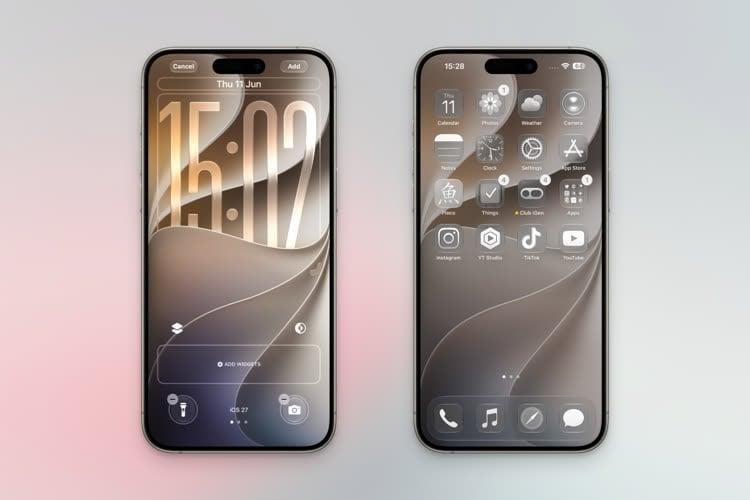
Apple continues refining the Liquid Glass visual design introduced in its recent software generation.
In iOS 27, the focus is on improving readability while keeping the translucent appearance that gives the interface its distinctive look.
Users can personalize the appearance through a new setting that allows adjustments between a clearer and more tinted presentation.
This is useful because not everyone prefers the same visual style.
Some users enjoy transparent interface elements, while others prefer stronger contrast because it makes text and controls easier to see.
The refinements aim to balance visual appearance with practical usability.
Rather than completely changing the interface, Apple has focused on making the existing design feel more polished.
10. Faster Performance and System Improvements
Not every important iOS 27 improvement is visible.
Apple has also worked on general responsiveness throughout the operating system.
The company highlights improvements in areas such as application launches, loading photographs, AirDrop transfers, memory usage, and display rendering.
Search has also received attention, with more relevant results in Spotlight, Photos, and Mail.
Connectivity Assist is another useful addition. It helps make transitions between Wi-Fi and cellular networks more seamless.
These changes might not look as exciting as a new AI feature, but they can have a meaningful effect on everyday use.
A phone that opens applications quickly, finds information efficiently, and handles background tasks smoothly is simply more pleasant to use.
The actual performance improvements will depend on the iPhone model, battery condition, available storage, and the applications installed.
11. Improved Accessibility Features
Accessibility is an important part of Apple’s software development, and iOS 27 introduces several useful improvements.
VoiceOver has received enhancements that provide richer descriptions of images and other visual content.
This can help people with visual impairments understand information displayed on their screens.
Another addition is automatic captioning.
The feature can generate synchronized subtitles for videos and translate existing captions into supported languages.
Magnifier has also received improvements designed to make visual assistance more useful.
These changes demonstrate that Apple’s software updates are not only about adding features for everyday convenience. They can also make smartphones more accessible to people with different needs.
12. Better iCloud Shared Albums
Sharing photographs with friends and family becomes more convenient with the updated Shared Albums experience.
Apple has expanded the ways people can contribute to and interact with shared collections.
One notable improvement is better support for full-resolution photo sharing.
Users can also benefit from improved filtering, reactions, and invitations.
Apple has made it easier for people using Android devices and Windows computers to participate through iCloud.com.
This is useful for families and groups that do not all use Apple devices.
13. Improved Health and Home Features
iOS 27 also brings smaller but meaningful improvements to the Health and Home applications.
Cycle Tracking can provide notifications when recorded cycle patterns suggest possible perimenopause. Users can also track related symptoms and access educational information.
The Home app receives additional Apple Intelligence capabilities.
Related activity notifications can be combined, making it easier to understand what is happening around the home.
Users can also search supported HomeKit Secure Video recordings using descriptions of events.
Supported security cameras can now stream and record in 4K.
These additions make the iPhone more useful as a central device for managing personal activities and smart-home equipment.
14. GymKit Comes to iPhone
Fitness enthusiasts also have something interesting to explore.
GymKit support now extends to iPhone, allowing users to connect to compatible cardio equipment.
Supported equipment includes:
- Treadmills.
- Elliptical machines.
- Exercise bikes.
- Stair-stepper machines.
This can provide more accurate real-time workout information when using compatible equipment.
AirPods Pro 3 can also help track heart rate during supported workouts.
For people who exercise regularly, this makes the iPhone more useful as part of a connected fitness experience.
iOS 27 Compatible iPhones: Full Device List
One of the most important questions before installing a major iOS update is whether your iPhone supports it.
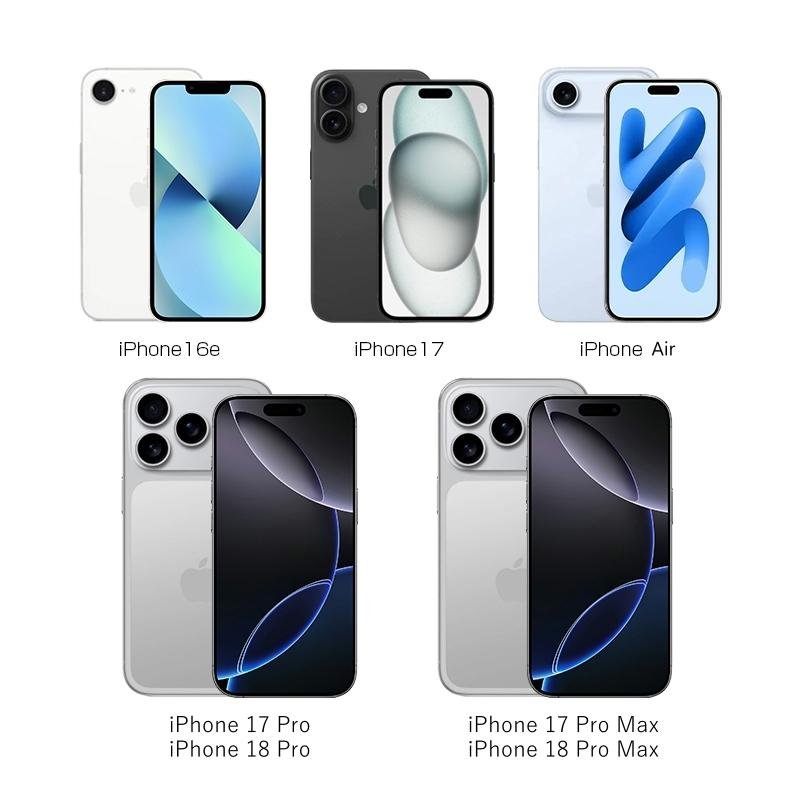
The good news is that iOS 27 supports a broad range of devices, including the iPhone 11 series and newer models.
Here is the compatibility list:
| iPhone model | iOS 27 support |
|---|---|
| iPhone 18 Pro / Pro Max | Yes |
| iPhone Duo | Yes |
| iPhone Air | Yes |
| iPhone 17 / 17 Pro / Pro Max / 17e | Yes |
| iPhone 16 / 16 Plus / 16 Pro / Pro Max / 16e | Yes |
| iPhone 15 / 15 Plus / 15 Pro / Pro Max | Yes |
| iPhone 14 series | Yes |
| iPhone 13 series | Yes |
| iPhone 12 series | Yes |
| iPhone 11 series | Yes |
| iPhone SE (2nd generation and later) | Yes |
Important: Being compatible with iOS 27 does not mean every iPhone supports every new feature.
Which iPhones Support Siri AI?
Apple Intelligence and the advanced Siri AI experience require newer hardware.
The supported iPhone models include:
- iPhone 15 Pro.
- iPhone 15 Pro Max.
- iPhone 16 and newer models.
Some advanced features have additional hardware requirements. For example, certain on-device voice and dictation capabilities are limited to newer models.
If you own an iPhone 11, 12, 13, or 14, you can still install iOS 27, but you should not expect access to all the new AI features.
How to Download and Install iOS 27
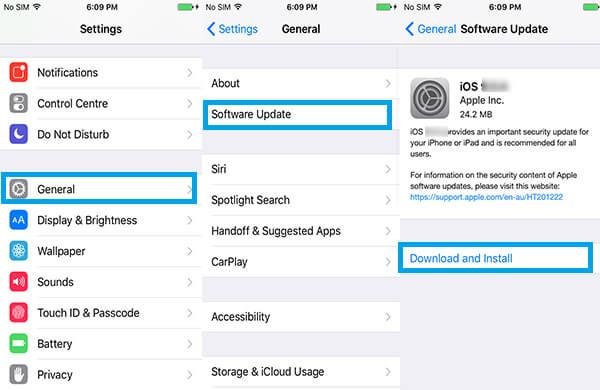
If your iPhone is compatible, installing iOS 27 is relatively straightforward.
Follow these steps:
Step 1: Back up your iPhone
Before installing a major update, create a backup using iCloud or a computer.
This helps protect your photographs, messages, contacts, and other important information.
Step 2: Connect to Wi-Fi
A stable Wi-Fi connection is recommended because major software updates can be large.
Step 3: Check your battery
Make sure your iPhone has sufficient battery power. Connecting it to a charger during installation is recommended.
Step 4: Open Settings
Go to:
Settings → General → Software Update.
Step 5: Check for the update
Your iPhone will check for available software updates.
If iOS 27 or a newer iOS 27 release is available, follow the on-screen instructions.
Step 6: Download and install
Tap the download and installation option and wait for your iPhone to complete the process.
Your device may restart several times during installation.
Do not disconnect the charger or interrupt the update unnecessarily.
Does iOS 27 Affect Battery Life?
Battery life is one of the biggest concerns whenever Apple releases a new iOS version.
Some users may notice increased battery consumption immediately after installing a major update.
This does not necessarily mean that iOS 27 has poor battery optimization.
After installation, an iPhone may perform background activities such as indexing photographs, organizing files, updating application information, and completing system processes.
These activities can temporarily increase battery usage.
There are several ways to improve battery efficiency:
- Check which applications consume the most battery.
- Reduce unnecessary background activity.
- Disable notifications from applications you rarely use.
- Keep applications updated.
- Use Auto-Brightness when appropriate.
- Check Battery Health if your iPhone is older.
It is also worth giving your device some time after installation before judging its battery performance.
Older iPhones with worn batteries may experience different results from newer devices.
Is iOS 27 Safe to Install?
For compatible iPhones, installing official software updates is generally recommended.
Apple regularly releases updates to address security vulnerabilities, fix software problems, and improve device stability.
However, there are a few things users should consider before updating.
First, make sure that important applications are compatible with the latest operating system.
Second, create a backup before installing the update.
Third, check that you have enough available storage.
If your iPhone is essential for work or business, you may prefer to wait briefly after a major release to see whether any widespread problems are reported.
It is also important to download updates directly through Apple’s official Software Update settings rather than using unofficial installation files.
iOS 27 Privacy and Artificial Intelligence
Artificial intelligence can make smartphones more convenient, but it also raises important questions about personal information.
Siri AI is designed to use relevant personal context to provide better assistance.
For example, it may help locate information from supported applications or find something in your previous conversations.
That convenience makes privacy controls especially important.
Apple provides settings that allow users to manage which applications Siri, Search, and suggestions can access.
The newer Excluded Apps control offers a more direct way to manage these permissions.
Users should review their privacy settings and decide which applications they want to make available to Apple’s intelligence features.
It is also worth understanding that some AI capabilities rely on server-side processing and may have usage limits.
Availability and processing arrangements can vary depending on the feature, device, language, and region.
The best approach is to explore the available privacy controls rather than assuming that every AI feature works in exactly the same way.
iOS 27 Availability in Different Countries
Although iOS 27 is available internationally, certain features are subject to regional restrictions.
Apple Intelligence and Siri AI require supported devices and supported system languages.
Siri AI initially launched in English and has expanded to additional languages, including French, Japanese, Korean, Portuguese, and Spanish.
Some Apple Intelligence features support a broader selection of languages, but not every capability is available in every language.
There are also regional restrictions. For example, Apple states that Siri AI is not initially available on iOS devices in the European Union or mainland China.
For users in countries such as Pakistan, it is important to check the supported language and feature requirements on Apple’s official availability pages.
Having an eligible iPhone does not automatically guarantee that every AI capability will appear.
Is iOS 27 Worth Installing?
For most users with compatible iPhones, iOS 27 is a meaningful upgrade.
The most interesting improvements are not necessarily the visual changes. They are the ways the operating system can help with everyday tasks.
Siri AI makes the assistant more conversational and useful. Improved photo editing gives users additional creative options. Safari becomes more organized, and parental controls provide families with better management tools.
There are also improvements to performance, accessibility, connectivity, and the overall iPhone experience.
However, the value of the update depends on the device you own.
If you have an iPhone 15 Pro or newer, you can take advantage of a much larger selection of Apple Intelligence features.
If you own an older compatible model, you still receive the operating system improvements, but some of the most advanced AI capabilities will not be available.
Overall, iOS 27 is a worthwhile update for users who want a more capable, intelligent, and convenient iPhone experience.
Other Useful iOS 27 Improvements
Beyond the headline features, Apple has included several smaller additions that can make everyday tasks easier.
Messages and Mail Suggestions
Messages and Mail can suggest actions based on the context of a conversation.
For example, if someone sends you details about a meeting, your iPhone may suggest creating a calendar event or adding a reminder.
This reduces the need to manually copy information between applications.
Better Password Management
The Passwords app introduces improvements that help users identify weak or compromised passwords and update them more conveniently.
This is particularly useful for people who use multiple online accounts.
Custom EQ for AirPods
Users can personalize audio settings by adjusting low, middle, and high frequencies through AirPods settings.
This gives listeners more control over their audio experience.
Better Podcasts and Entertainment
Apple has also made smaller improvements across its entertainment applications, making it easier to discover new episodes and continue listening where you stopped.
These changes are not necessarily major reasons to update, but they contribute to a more polished operating system.
Frequently Asked Questions About iOS 27
1. Is iOS 27 officially released?
Yes. Apple released iOS 27 on September 14, 2026.
2. Is iOS 27 free?
Yes. iOS 27 is a free software update for compatible iPhones.
3. Does iOS 27 support iPhone 11?
Yes. The iPhone 11 series is compatible with iOS 27.
4. Does iPhone 12 support iOS 27?
Yes. All iPhone 12 models support the operating system.
5. Does iPhone 13 support iOS 27?
Yes. The iPhone 13, 13 mini, 13 Pro, and 13 Pro Max are compatible.
6. Which iPhones support the new Siri AI?
Apple Intelligence-enabled iPhone 15 Pro, iPhone 15 Pro Max, and iPhone 16 models or newer support the main Siri AI experience, subject to individual feature requirements.
7. Can I install iOS 27 without Wi-Fi?
A Wi-Fi connection is recommended for downloading the update. You can also use supported computer-based update methods.
8. Will iOS 27 slow down older iPhones?
Performance varies by model and device condition. Apple has introduced system optimizations, but older hardware may not deliver the same experience as newer iPhones.
9. Does iOS 27 have new AI photo editing?
Yes. It introduces Spatial Reframing, Extend, and an improved Clean Up tool.
10. Is Siri AI available in every country?
No. Availability depends on region, language, device compatibility, and Apple’s rollout arrangements.
11. Can I install iOS 27 on iPhone SE?
Yes. The second-generation iPhone SE and newer SE models are compatible.
12. Should I update to iOS 27?
For most compatible users, updating is recommended, particularly for security improvements and new functionality. Back up your device before installing.
Final Thoughts
iOS 27 represents another important development in Apple’s approach to smartphone software.
Rather than concentrating entirely on a new appearance, Apple has focused on making the iPhone more intelligent and useful through artificial intelligence, improved applications, photography tools, and better system integration.
Siri AI is arguably the biggest attraction, especially for users who want their phones to understand more complicated requests and help with everyday activities.
The improvements to Safari, Photos, accessibility, and parental controls also make the update valuable for a wider range of users.
Not every feature will be available on every iPhone, and some capabilities are still dependent on language and regional support. Nevertheless, the update offers meaningful improvements across Apple’s supported device range.
If you own a compatible iPhone, iOS 27 is worth exploring. It provides a more capable software experience and offers an interesting look at how artificial intelligence is becoming part of everyday smartphone use.