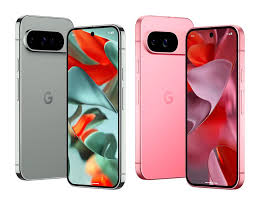
I’ve been checking out the new Pixel phones, and they’ve definitely made some waves this year. We’ve got fresh designs, new specs, and a bunch of new features—plus, a few new issues and, of course, higher prices. So, let’s dig into what really stands out about these phones.
We’ve been waiting for Google to deliver a top-tier flagship, and it feels like we’ve finally got one. But, did anyone else watch the Google event where these were announced? It kind of felt like the phones were just a side note in a big software showcase. That didn’t exactly fill me with confidence. After using these phones for a couple of weeks, though, I can give you the lowdown on what’s working and what’s not.
Hardware
When I say these phones feel like true flagships, I’m mostly talking about the hardware. At first glance, they might seem like last year’s models with sharper edges, but there are some noticeable upgrades. For one, the screens are brighter—2,700 nits on the Pixel 9 and 3,000 nits on the 9 Pro. The bezels are now perfectly even all around, with the display wrapping neatly around the corners.
The new ultrasonic fingerprint reader is a big win. It’s much quicker and more reliable than the old optical sensors. The only tiny gripe I have is that I wish I could unlock the phone even when the display is off. Right now, you need the always-on display, or you have to press the power button or wait for a notification to unlock it. It would be great if the Pixel could unlock from a blank screen like some Samsung phones, where the spot on the display always acts as a hotspot.
Overall, the haptics are great, and the buttons have a nice clicky feel this year.
Let’s talk about what’s under the hood. The new Tensor G4 chip and extra RAM are key upgrades. Now, the Tensor G4 might not blow your mind with a massive power boost compared to last year’s chip. In fact, for most everyday tasks, you probably won’t even notice a difference. But what’s cool is the upgraded NPU, which is now way more powerful and focused on AI tasks. And a good chunk of that extra RAM is dedicated to AI, too. I’ll get into the AI stuff in a bit, but it’s nice to see that alongside the usual minor tweaks, the Pixel’s getting some meaningful hardware upgrades.
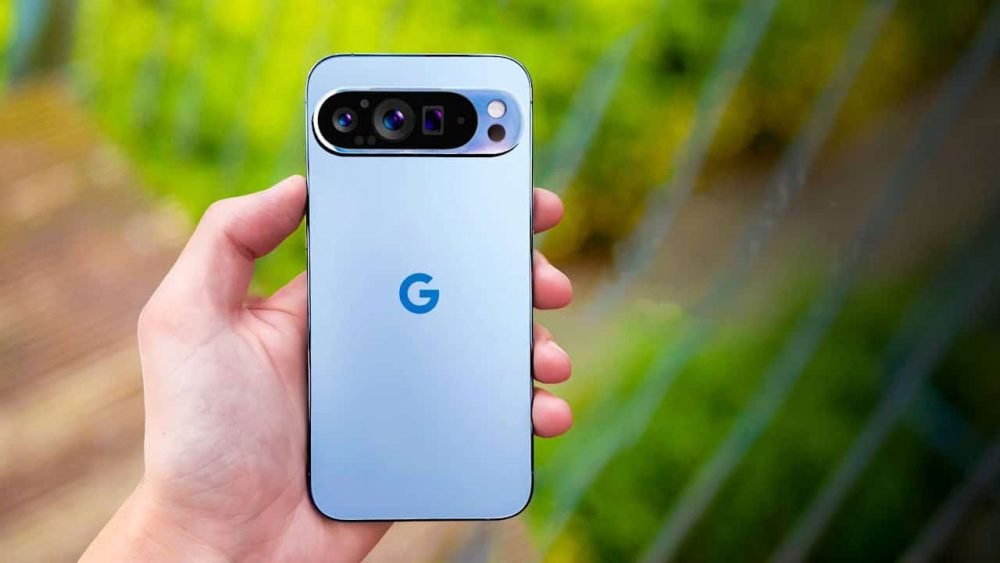
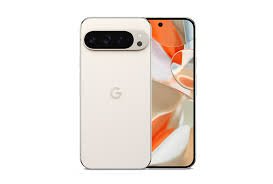
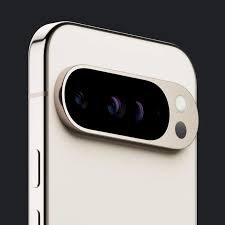
As for the design, it’s sticking with the squared-off sides that fit in with the iPhone and Samsung crowd. I’ve mentioned before that I like this look, and the new camera design is growing on me too. It’s moved from a visor to more of a shelf or island. It might look a bit odd in some pictures, but trust me—it looks great in person. Even if it ends up collecting dust like last year’s model, it’s a nice touch. Plus, there’s a new size option this year that gives you a Pro model without going full XL. I’m a bit worried it might not be as popular as the larger or smaller versions, but I’m happy to have the choice. Enjoy it while it lasts!
Now, let’s get into some things that bug me—because hey, this is a $1,000 phone. The battery sizes haven’t changed: 4,700 milliamp-hours for the smaller model and 5,000 milliamp-hours for the bigger one. Battery life has been pretty good with the XL, giving me over five hours of screen-on time with heavy use. But the charging speeds? Not so much. The XL maxes out at 37 watts, and the smaller models are even slower. I’m not asking for crazy-fast charging like some brands, but a bump to 50-60 watts would make a big difference.
Also, there’s a bit of a design oddity. The Pixel 9 has matte sides with a glossy back, while the Pixel 9 Pro flips that with glossy sides and a matte back. Personally, I’m all about the matte sides and would have loved to see a matte-on-matte look. Lastly, the base model starts at $799, which is already pushing it, and for a $1,000 phone, 128 GB of storage just doesn’t cut it anymore. It’s 2024—256 GB should be the starting point.
Cameras
Cameras have always been a big part of the Google phone experience, and the Pixel 9 series keeps that tradition alive—though with some tweaks. Both the Pixel 9 and Pixel 9 Pro come with the same primary and ultra-wide cameras. The Pro model adds a telephoto lens with 5X zoom for those extra close-up shots.
The primary camera is pretty similar to last year’s, but the ultra-wide lens has seen a big upgrade from 12 megapixels to 48 megapixels, though it still outputs at 12 megapixels. Using these new cameras is a breeze. The camera app is quick and responsive, offering easy modes that make it simple to snap great pictures. However, you’ll notice that Pixel photos still have that distinctive, highly processed look—lots of HDR, contrast, and sharpening. This can make your shots look punchy, which is great for social media, but some might prefer a more natural appearance.
The selfie camera on the Pixel 9 Pro is a standout, with improved detail and color compared to the standard Pixel 9. It’s a solid upgrade if you’re into selfies. For video, I tested the Pixel 9 Pro XL by shooting a 4K30 video using just the built-in mics—no external equipment at all. The video is sharp but still has that processed Pixel look, with a lot of focus on face lighting and color adjustments. If you’re curious, I’ve got a full video review linked below. You might also want to subscribe for more car content.
Google is always tweaking its cameras, so future updates might make the photos look a bit more natural. But that’s part of the Pixel charm—along with all the AI-driven features and enhancements that set it apart.
The Pixel Experience
Google not only makes Android but also its own phones, so you’d expect the Pixel to showcase the best of Android. However, the Pixel 9 series comes with Android 14, even though Android 15 is just around the corner. It’s funny that the latest Pixels are running a version behind, but they will be among the first to get Android 15 and enjoy seven years of updates.
Every time I switch back to a Pixel, I’m reminded of the features I miss on other phones. Call screening, for instance, is fantastic on Pixels—far better than Samsung’s Bixby version. The “Now Playing” feature, which identifies songs playing around you, is another favorite.
The Pixel 9 series introduces some new features, like Call Notes, which records and summarizes phone conversations, and a revamped Pixel Weather app. I was skeptical about the weather app at first, but it’s turned out to be quite good, with a nice, customizable UI. You can rearrange tiles to see the information you care about most. It doesn’t let you change the weather source, but that’s a minor gripe.
The new panorama UI in the camera app is a nice touch, and the Pixel 9 Pro now has a temperature sensor that works on people, providing live temperature readings as you move around. This isn’t for medical use, but it’s a cool feature that shows Google’s commitment to refining even the smallest aspects of the phone.
The big highlight is the integration with Gemini, Google’s latest assistant. The Pixel 9’s boot-up animation even transitions from the Google logo to the Gemini logo, emphasizing how central this new technology is to the experience. Let’s dive into what Gemini brings to the table.
Alright, let’s talk about Gemini. Google has a knack for making things confusing with their endless rebrands, but Gemini is definitely the one to focus on right now. This little assistant has a lot riding on it, and honestly, it’s pulling its weight. Over the past few weeks, I’ve seen Gemini get better and better, picking up new skills and really improving its performance. It’s conversational, remembers what you’re talking about, and usually nails your questions. I’m thinking it’s time for an updated assistant showdown since my last one was with Google Assistant, not Gemini.
Here’s where it gets a bit odd: Google launched Gemini as this big, new assistant, but Google Assistant is still hanging around on these phones. It’s like having two assistants at once. For a while, Google Assistant was actually better for certain tasks. Gemini couldn’t handle things like setting timers or giving directions, and it was missing basic home control functions. So, people stuck with Google Assistant for those things. It was all a bit confusing.
Even now, on the Pixel 9, you can pull up Gemini by holding the power button or swiping up from the corner. But if you tap the home screen widget, you’re still using Google Assistant. It’s like Google is trying to switch everyone to Gemini but hasn’t quite fully made the jump.
The good news is, Gemini can now handle timers, alarms, music identification, and smart home controls like adjusting the Nest thermostat and turning on lights. However, when it does these things, it sometimes shows the old Google Assistant logo in the corner. It’s a bit puzzling—why not just get the job done without the extra branding?
You can also enable Gemini extensions in the settings, which lets it access more of your personal info through apps like Google Docs, Drive, and your calendar. This is where Gemini really shines. Asking it to find emails, check traffic for your next event, and other tasks feels almost like chatting with a real person.
When you switch to Gemini Live, you get a fully conversational mode, which can be super handy or a bit awkward, depending on the situation. For example, if you’re dealing with a wasp nest:
[Assistant] Wasps can be pretty aggressive, so safety is key. Do you know what kind of wasps are in the nest? That’ll help me suggest the best way to handle it.
I have no idea, but they’re really active all the time.
Got it.
First off, try to figure out what kind of wasps you’re dealing with. Are they yellow and black with a narrow waist? They’re probably yellowjackets. Or are they brown or gray with a wider waist? Those could be paper wasps.
You know what? I don’t want to get too close. Can you find a pest control service nearby?
Sure thing.
The effectiveness of Gemini really depends on your internet connection and how accurately it processes things. But when it works, it’s super useful, especially for follow-up questions. It feels more like a real conversation than just typing queries into Google.
All in all, Gemini is pretty impressive at this point. I’m planning to compare it with the new Siri, ChatGPT, and maybe a few others in an updated assistant showdown. Subscribe if you want to catch that comparison. For now, I’m definitely a fan of what Gemini is doing.
One last thing: you can use Gemini on any Android phone. Google even showed it off with a Galaxy S24 Ultra at their event, so it’s not exclusive to the Pixel. This makes me wonder: if Gemini isn’t unique to the Pixel, what’s the deal with all the extra NPU power and RAM dedicated to AI in the Tensor G4? What’s that all about?
Sure thing! Here’s a more conversational and human-written version of your thoughts:
AI: Overrated or Underrated? Breaking Down Pixel 9’s New Features
Hey everyone! I’ve been playing around with the new AI features on the Pixel 9 for the past couple of weeks, and I’m excited to share my thoughts. I’ve divided these features into three categories: useful, meh, and gimmicky. Let’s dive in!
Useful Features:
Gemini (Assistant): This is a standout. It’s fast and reliable, making your Pixel experience smoother and more intuitive.
Call Notes: This feature is a game-changer if you need to remember details from important calls. It records, transcribes, and summarizes your conversations, which is super handy.
Video Boost: This one surprised me. It really does make a noticeable difference in video quality, giving your videos a polished look.
Add Me: This feature lets you combine two photos to make sure everyone gets in the shot, even if you’re alone. It’s pretty nifty, though I’m curious to see if people will use it regularly or just stick to selfies.
Meh Features:
Weather Summaries: The AI-generated summaries in the weather app can be helpful, but they don’t always catch every detail, like surprise rain clouds.
Magic Editor’s Reimagine Feature: You can tweak parts of your photos and add text to create something new. It’s fun to play with, but the results can be hit-or-miss, especially with more dramatic changes.
Screenshots App: This app organizes your screenshots and lets you search through them. It’s handy, but I wonder why this wasn’t integrated into Google Photos. It feels a bit redundant compared to what’s already out there.
Gimmicky Features:
Zoom Enhance: This feature promises to reveal hidden details in your photos when you zoom in. In reality, it just turns up the clarity filter and adds some fake texture. It’s not as impressive as it sounds.
Pixel Studio App: This app generates images on your device quickly, which is cool, but it’s mostly good for fun experiments rather than practical uses. If you want to create a meatball sub with legs, this is your tool!
Conclusion:
Overall, the Pixel 9 brings some solid AI features to the table and continues to be a top choice for smart tech enthusiasts. Whether you dive into these new features or stick with the basics, it’s a great phone that offers a lot.
I’d love to hear what you think! Are there any features you’re excited to try or ones you’d skip? Drop a comment below and let’s chat!
Also, a big shoutout to Anker for sponsoring this video. Their new Anker Prime lineup is seriously impressive. The charging station can deliver up to 250 watts across multiple ports and lets you prioritize charging for different devices. The power bank has a 9,600mAh capacity and can output up to 65 watts, and it doubles as a wall charger. Check them out in the description!
That’s all for now. Managed to get this in before the rain started—talk to you soon!


