Okay, so I might sound a bit crazy, but hear me out. I genuinely believe that this phone, as of mid-January 2024, has a serious shot at being one of the top three smartphones of the year. Let me tell you why I think that. First off, let’s talk about the packaging. It’s sleek, sure, but there’s this whole stack of booklets in there, which feels a bit outdated. But wait, underneath all that, you’ve got not just a regular USB-C cable, but also this super-fast 100W charging brick. That’s a nice touch, right? Oh, and don’t forget the pre-installed screen protector—definitely not something you see every day anymore.
Now, here’s the kicker: the price. While I’ll be comparing it to phones like the Samsung Galaxy S24 Ultra and the iPhone 15 Pro Max, which cost upwards of $1,200, this bad boy comes in at just $799. And let me tell you, it doesn’t just meet expectations; it knocks it out of the park in all the key areas: design, battery life, display quality, software, speed, and camera. But there’s a little snag you should know about…
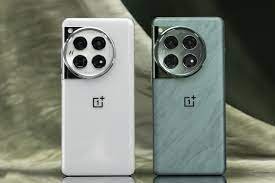
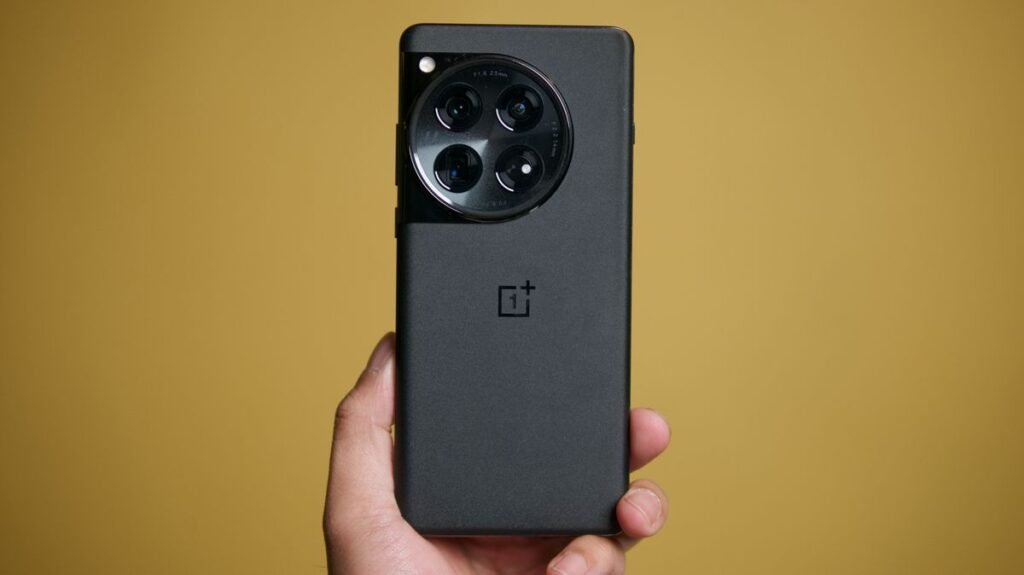
Let me paint you a picture of this phone – it’s a statement piece, exuding confidence in every curve and detail. The chrome rails seamlessly merge into the back, while the matte marble texture, though it feels a bit plasticky to the touch, screams opulence. And those glossy marble accents on the cameras? They’re adorned with a subtle hint of glitter, elevating the phone to collector’s edition status. While it may not bear the OnePlus logo, it shares the same comfortable, rounded design language, complete with the signature alert slider on top. While I see the appeal of silencing the phone with a quick flick of the slider, I can’t help but feel it’s a bit redundant when a virtual button would suffice.
Now, let’s talk about a real game-changer – the OnePlus 12’s Aqua Touch feature. Have you ever tried using a touchscreen with wet fingers or on a damp screen? It’s a nightmare. But with Aqua Touch, that’s a thing of the past. This custom display chipset is so intuitive, it can distinguish between intentional touches and unwanted moisture, minimizing those frustrating screen spasms. Sure, it’s not flawless, and the fingerprint scanner may act up occasionally when the phone’s wet, but it’s a giant leap towards fully harnessing our phones’ water-resistant capabilities. As someone who enjoys multitasking with Pokémon news updates in the shower, this newfound freedom is nothing short of revolutionary. Hats off to Miler for this game-changing innovation.
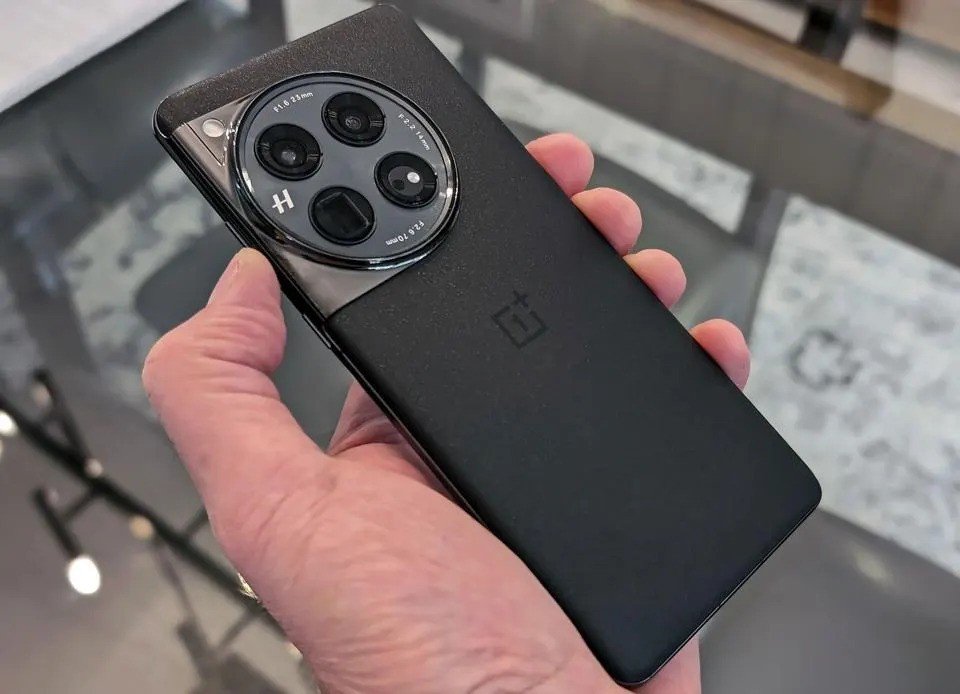
I really like this design, but if I had to nitpick, it’s not the most attractive from the front. The top corners look a bit like ears because of the curved screen, and that big bottom bezel is a pet peeve of mine that seems to get worse every year as other companies ditch it. But where this phone truly shines is its battery life.
It feels like most phone makers are afraid to give us too much battery. They’ll gladly cram in extra screen or camera features we don’t really need, but when it comes to battery, they hold back. Maybe they worry we won’t upgrade as often if our batteries last longer, or they just don’t want to make the phone a tiny bit thicker to fit a bigger battery. But the OnePlus 12 bucks that trend with a hefty 5,400 mAh battery.
They’ve gone from having no wireless charging at all to supporting super-fast 50W wireless charging, which can fully charge that big battery in less than an hour—though you’ll need a special OnePlus charging stand for that speed. Personally, I’ll probably stick with my regular charger. And if you’re in a pinch, you can even use the phone to charge up your friend’s device wirelessly.
But the real game-changer is the included 100W charging brick. It can take your phone from completely dead to 100% in just 26 minutes. Compared to iPhones or even the latest Samsungs, the battery experience with this phone is on a whole other level. And they’ve even thought about battery health, which is a nice touch.
Understanding the lightning-fast charging capability and the potential heat output of this robust smartphone, the company has ingeniously embedded a dedicated power management chip. This chip dynamically regulates the charging speed by leveraging data from 14 temperature sensors dispersed across the phone, in addition to one within the charging brick. Its primary function is to uphold the battery at its optimal temperature, ensuring swift charging without jeopardizing the battery’s health due to overheating. OnePlus asserts that this technological innovation, coupled with sophisticated software enhancements, mitigates battery degradation over time. They confidently claim that even after four years of daily usage, the phone will maintain peak performance, boasting an impressive 4,350 mAh capacity, ample for a full day’s use.
Regarding longevity, while it’s challenging to validate these assertions until years later, OnePlus appears adept at optimizing battery efficiency. Anecdotal evidence suggests exceptional battery life, especially as the phone adapts to user behavior over time. Standby power consumption is minimal, allowing users to seamlessly resume their activities even after leaving the phone untouched overnight.
Transitioning to the display, the OnePlus 12 sets new benchmarks with its screen technology. Featuring a 120 Hz Quad HD+ resolution panel with a unique pixel arrangement optimized for contrast and readability, it surpasses prior standards. Incorporating LTPO 3.0 technology enables precise refresh rate adjustments, effectively conserving energy. However, the most remarkable feature is its maximum brightness, reaching an unprecedented 4,500 nits. While this extreme brightness may have limited practical utility in everyday scenarios, it promises an unmatched viewing experience, particularly for high dynamic range content in outdoor environments.
There’s another side to consider as well, which I find particularly intriguing. As the phone’s display dims below the 70 nit mark, it switches over to 2,160 Hz PWM dimming. Now, what does that mean exactly? Let me break it down. In the old days, phones used LCD displays, essentially a white backlight shining onto colored pixels. Adjusting brightness was simply a matter of reducing the power to that backlight. Then came OLED displays, offering richer, more vibrant colors because each pixel is its own individual LED. But here’s the catch: dimming OLEDs the same way as LCDs risks messing with color accuracy. So, many phones now use something called PWM dimming. Essentially, the screen flashes on and off super fast, faster than the eye can catch, adjusting brightness by playing with the duration of these flashes instead of dimming individual pixels. Sounds like a solution, right? Well, not entirely. Most Samsung and Apple phones refresh at 240 or 480 Hz, still fast enough for some folks to subconsciously notice the rapid flashing, which can lead to discomfort, especially at night. OnePlus, however, takes a different approach: using DC dimming at higher brightness levels to keep colors true, and switching to PWM dimming at 2,160 Hz as brightness decreases, giving us the best of both worlds. Plus, they throw in a hardware-level blue light filter for good measure, resulting in a screen that’s both visually stunning and easy on the eyes.
And here’s a fun tidbit: this setup also makes filming easier, as the reduced flickering at low brightness levels means smoother recordings. Oh, and did I mention the display is protected by Gorilla Glass Victors 2? It’s tough enough to survive everyday drops, though I wouldn’t recommend putting it to the test. Now, onto point number four: the software.
Using this phone with OxygenOS 4 is an absolute joy, though I do have a couple of minor gripes, mostly revolving around its aesthetics. I mean, who thought square icons were the way to go? And why do we have every geometric shape imaginable in the settings menu except circles? It’s baffling. Ever since OnePlus merged with Oppo, the software’s visual appeal seems to have taken a hit. The icons, menus, even the app drawer—they all feel more like an Oppo phone than a OnePlus.
Take this notification, for example: the group name gets cut off by an unnecessary arrow, and there’s an icon blocking part of the message. It’s just not up to par.
But, thankfully, these complaints are only skin-deep. Digging deeper, I’ve got to hand it to them: the software on this OnePlus 12 is truly something special, one of the most thoughtful and useful Android skins I’ve come across. Let’s talk about the screen recording feature, which now lets you seamlessly add front camera footage. And navigating with one hand is a breeze; just swipe up and all icons come to you. It’s become my default mode of navigation. Then there’s Quick Launch—hold down the fingerprint scanner and jump straight into any app, skipping any distractions along the way. I’ve customized mine to handle all the key work tasks I frequently use, even starting new Google docs.
The software’s intelligence shines through in subtle ways. It adjusts notification volume and vibration intensity when you’re in fullscreen mode, knowing you’re already focused on the screen. It even anticipates your actions, automatically answering calls and switching to the earpiece when you lift the phone to your ear. These little details, though often overlooked, truly enhance the overall user experience.
So, there’s this thing called Fluid Cloud, kind of like a clone of Dynamic Island, but it’s cool because it keeps you updated without overcrowding your screen. It’s pretty neat, but right now, it only works for certain apps, which is a bit of a bummer.
But let me tell you, this phone is like the ultimate app babysitter. It keeps an eye on all your downloads and if any app starts acting up, like draining your battery in the background, it gives you a heads up. And with just a tap, you can rein them in without completely shutting them down. It’s like your phone is laying down the law for you, which feels pretty satisfying.
And when it comes to customizing your phone, OnePlus doesn’t hold back. You can tweak everything from your status bar to how your fingerprint scanner looks and behaves, all without needing extra apps. Seriously, I spent my whole first day just diving into the settings because there’s so much you can do.
There are a couple of features that are cool but maybe not totally necessary. Like Shelf, which OnePlus suggests you use instead of your notification bar. It’s handy for stuff you don’t check all the time, but I didn’t feel like I needed instant access to it.
Then there’s this anti-peeping notifications thing, where your phone uses the front camera to see if someone else is snooping on your screen. If it detects someone, it still gives you notifications but in a less revealing way. It’s a clever idea, but I don’t think I’ll use it much. I mean, it’s gotta use up some battery, and honestly, it’s not hard to notice when someone’s peeking at your phone.
The standout feature of this software experience is undoubtedly the inclusion of OnePlus’s most powerful vibration motor yet. This means your phone delivers incredibly immersive haptic feedback. Whether you’re typing, setting up your fingerprint, or deleting a photo, the device responds in a way that truly engages your senses. It’s like the phone is communicating with you, making the OnePlus experience feel more personal. And let’s not forget about the blazing fast speed of the software, which is a major highlight.
As for the hardware, the OnePlus 12 is powered by the Snapdragon 8 Gen 3 chip, which is no surprise given its status as a flagship phone in 2024. However, what’s really exciting are the additional enhancements OnePlus has made. And I haven’t even touched on the minimum storage of 256GB…
“You know when people talk about what makes a phone lightning-fast? It’s not just about the fancy storage or the hefty RAM. It’s like this intricate dance between the hardware and software. Imagine your phone as a stack of layers. Every time you tap on something, all these layers have to talk to each other to make things happen. Like when you plug in your phone to charge, it’s like a chain reaction—from the hardware detecting it, to the Android system kicking in, to finally seeing that little charging symbol pop up.
You’ve probably heard how Apple nails it with their tight integration of hardware and software, right? Well, OnePlus is trying to pull off something similar with their Trinity Engine. Instead of just focusing on one part, they’re making sure every layer works together seamlessly. So, your phone isn’t just fast now; it’s smart too. The CPU only kicks into high gear when it needs to, the RAM knows which apps you use the most and keeps them ready to go, and even the memory tidies itself up to keep your phone running smoothly in the long run.
It’s all about making your phone work smarter, not harder. Whether you’re snapping pics or just scrolling through social media, it’s like your phone knows exactly what you need, exactly when you need it.”
You know, amidst all the tech jargon and flashy marketing, one thing’s for sure: this Android experience is lightning-fast. I’ve had my fair share of “fast” phones before, but this one’s on a whole other level. You know how browsing the Google Play Store usually comes with a bit of lag? Not here. Everything loads up so quick, and the animations are so smooth that sometimes you forget you’re even switching between apps—it all just blends seamlessly.
And gaming? Oh man, it’s a game-changer. Literally. This phone has this extra chip called the Pixel Works X7 that teams up with the main one to do some serious magic. It boosts everything from resolution to frame rates and even extends the game’s dynamic range, without needing any tweaks from the game developers. It’s wild to see it in action. You can fire up an old Android game from like a decade ago, and it feels brand new, like it was made yesterday. And the newer games? They look unreal, with visuals taken to a whole new level. Plus, it can handle any game at a smooth 120 frames per second, even if it wasn’t originally built for it. How cool is that?
You know what’s really interesting? It’s this thing called Hyper Boost. It’s not just your average phone detecting a game and telling your CPU and GPU to kick into high gear. Nope, it’s way cooler than that. It’s like your phone’s Android system is this genius that knows exactly what the game needs at any moment and tells your chip to handle it just right. So, when things calm down in the game, your chip can take a breather and cool off for a bit. But when the action picks up again, your chip’s ready to dive back in, all thanks to staying cool. And can we talk about the phone’s crazy cooling system? It’s got this massive vapor chamber, like a metal container with a special liquid inside that turns to gas when things heat up, then cools back down and condenses. Plus, there’s this fancy thermal gel that helps spread the heat even more. And get this: there’s a whopping 38,000 mm² of heat dissipation area spread across five layers on both the front and back of the phone. I mean, that’s nuts, considering how small the phone is. And having those heat dissipation layers on both sides means it can cool off in two directions at once, unlike most phones with just one spot to let out heat.
But wait, there’s more! The cherry on top of this speed machine is Wi-Fi 7, Bluetooth 5.4, and those 360° antennas for 5G and Wi-Fi. No more signal interruptions when you’re gaming sideways! Now, let’s get real about the cameras. OnePlus hasn’t always had the best reputation for cameras, and after using this phone, I get why. The front camera? Meh. It’s not just about smoothing your face; it often makes you look washed out, even indoors when it’s not that bright. And the photos? They change so much after you take them because there’s a ton of processing going on. It’s like the OnePlus is doing all this work after the fact, so the shooting experience itself feels kinda rough. And don’t even get me started on the video. Compared to an iPhone, the OnePlus seems a bit clueless about adjusting to different lighting situations. Plus, without fancy focus tech like lasers, it sometimes struggles to focus properly.
But here’s the thing: there’s hope. Instead of just banking on their partnership with Hasselblad to fix everything, OnePlus could tackle these camera issues head-on. Because honestly, this camera setup isn’t bad at all. It’s actually a big improvement over previous OnePlus models, with similar hardware to newer releases and even a special coating on the main lens for better clarity. And considering the OnePlus 12’s performance in other areas, like its crazy speed, and the fact that it’s only $799, the camera quality here feels like a game-changer.
“It’s really impressive how quickly it snaps pictures, and that beautiful background blur it achieves with its wide aperture is just stunning. Plus, the colors it captures are consistently vibrant and true to life. I mean, there’s even a color temperature sensor tucked away in there that fine-tunes the colors using 13 different channels of info when you’re taking a shot – it’s almost perfect, hitting around 98%. But, every now and then, you might notice skin tones looking a bit off – just a tad cooler and a touch more intense. Despite that, I’ve gotta say, I’m really digging the way this camera works. It kinda makes you feel like an artist, especially with that impressive 64-megapixel three-time zoom lens. I’ve totally fallen for it – great for capturing people, flowers, you name it. And with OnePlus’s color tuning, even the most mundane scenes look surprisingly professional. Now, I’m not saying this phone’s cameras are the absolute best out there. If you’re all about the camera and willing to splurge, maybe go for a Vivo, Samsung, or iPhone. But hey, they’re not slouches either. I wouldn’t put them below the base-level Galaxy S24, which goes for a similar price, and they definitely hold their own against other phones like Asus Zen. So, bottom line, the OnePlus 12 is a solid phone. It might not have all the fancy AI features of Samsung or Google, but it nails the basics. But if you’re curious about what spending more on a phone gets you, I’ve got a video review of the S24 Ultra that might interest you. Catch you there!”