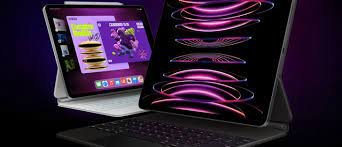
iPad Pro and iPad Air 2024 Review: Apple’s Fanciest iPads Aren’t Quite Macs Yet
“Hey, guess what I’m up to? I’m ditching my iPads for the sleek new MacBook Air. With the arrival of the 2024 iPad Pro and iPad Air, boasting a bunch of exciting new features, it’s tempting to stick with the tablet life. But despite their advancements, they still feel distinct from the MacBook lineup. Choosing between the two remains as tricky as ever, reminiscent of the dilemma from back in 2022.
However, there’s a notable shift happening – the iPad Pro is edging closer to MacBook Air territory. The latest iPad Pro is a real gem, sporting a gorgeous display, a powerful new processor, and a slew of other improvements. If only Apple would bless it with macOS, it could easily become my daily driver. Plus, its sleek design makes it a breeze to carry around. It’s not a drastic departure, but it’s definitely the slimmest device Apple has ever crafted. When you hold it, it feels remarkably light, almost like half a laptop, with all the essentials packed in. It does feel delicate though, so you’d want to handle it with care. Slap on a case, especially Apple’s magic keyboard case, and it bulks up a bit, but it’s still comparable in weight to a MacBook Air.
Now, let’s talk about the real game-changer – the iPad Pro’s M4 processor, ready for AI tasks. This beast of a chip is a significant leap forward, seemingly outpacing even current Macs. While we’re still putting it through its paces, initial impressions suggest it’s lightning fast. Apple is also revamping some of its core apps like Logic Pro 2 and Final Cut Pro 2, showing off the potential of AI-driven features. We got a sneak peek at Logic Pro 2, complete with AI-generated session players, offering a taste of the impressive performance you can expect from M series chips.”
We’re just about ready to share this with the world once we add a keyboard. Now, let’s talk about the 2024 iPad Pro. One of its standout features is the Tandem OLED Display, which is truly impressive. Apple calls it the ‘Ultra Retina XDR,’ harnessing the power of two OLED displays to deliver remarkable brightness and HDR contrast levels. It’s a first for iPads and looks fantastic, even compared to Samsung’s long-standing use of similar technology. Of course, this level of innovation comes with a price tag, but it’s the kind of display I’d love to see across Apple’s entire computer lineup, albeit at a premium.
While the current LCD liquid retina displays on iPads are still excellent for most tasks, the tandem OLED display truly excels with HDR content and graphics-intensive work, offering a noticeable boost in quality and refresh rate.
Another notable change in these iPads is the camera placement. Finally, there’s a front-facing camera positioned on the landscape edge. It’s been a long time coming, but it’s a welcome addition, also seen in the 10th gen iPad and iPad Air. However, the camera quality surpasses even that of my MacBook. Now, it feels like the go-to camera for media appearances, Zoom calls, and everything else in between.”
I hope this message finds you well! I just wanted to say, you’re looking really sharp. I’ve been using the camera on this iPad, and I have to say, it’s the best one I’ve seen so far.
However, there’s one thing that’s a bit disappointing – there’s no second camera on the back of the iPad Pro. In the past, there were two cameras, but now it’s just down to one rear camera along with LiDAR for depth scanning in AR. Personally, I don’t mind because I don’t usually shoot videos on my iPad, but I can see how some people might feel frustrated without that extra lens.
If you’re considering buying an iPad Pro, there are a couple of things you should keep in mind. The 12.9-inch model might seem like the perfect choice for watching movies, but its aspect ratio is a bit more square, which means you’ll end up with more letterboxing. So, it’s something to consider if you’re a big movie buff. Also, the processing power varies depending on how much you’re willing to spend. I had the chance to review the higher-end versions with extra RAM and processing cores, but I can’t speak to the performance of the entry-level models. It’s something worth considering, especially if you’re comparing it to Apple’s MacBook lineup.
Now, let’s talk about the iPad Air with M2. It looks pretty familiar, doesn’t it? That’s because Apple often takes inspiration from previous iPad Pro models when redesigning the iPad Air. It’s interesting to see how they evolve over time.
Anyway, just thought I’d share my thoughts with you. Hope you’re having a great day!
When I compare the 2022 iPad Pro with the Air, I can’t shake off this strong sense of déjà vu. You see, the iPad Air has never sported a 13-inch model before. So, it’s quite exciting to see this larger canvas now available at a more budget-friendly price. But hey, let’s not forget, you can often snag older iPad models or discounted iPad Pros, so it’s crucial to weigh your options carefully. Unlike its Pro cousin, which boasted mini-LED technology for superior contrast and blacks, the Air settles for a standard liquid Retina Display. Still, Apple’s liquid retina displays are pretty darn good for most tasks. Although, if you’re diving into HDR work, you might find it a tad lacking.
Now, onto what’s missing in the iPad Air compared to the Pro. There’s no LiDAR sensor on the back, which honestly, most folks won’t even notice. And instead of Face ID, you’ve got Touch ID, conveniently nestled on the front as a fingerprint sensor. Some might prefer this change, but overall, the Air feels quite similar to its Pro sibling in many respects. It’s nice that the iPad Air plays nice with most older iPad Pro keyboard accessories, although slight differences in thickness might throw a wrench in the works. Oh, and it’s a bummer that it doesn’t support the Apple Pencil 2; you’ll have to settle for the Pencil Pro or the USB-C pencil. Speaking of which, while the Pencil Pro looks identical to the Pencil 2, its app compatibility is still a bit lacking. But fear not, we’ll dive into its capabilities soon enough.
Certainly! Here’s a human-written version of the provided text:
Two new features have been introduced. Firstly, there’s a nifty addition concerning the brush functionality. You probably know about the hover feature, but now, if you lift the brush off the Edge, you can actually rotate it using the gyroscope. This neat trick is especially handy for artists, allowing them to adjust the brush angle or rotation. Secondly, there’s a new squeeze gesture with haptic feedback. When you squeeze the barrel, it brings up a new menu where you can select tools. The menu supports hover actions, and there’s a subtle tap feedback when you squeeze the barrel, which is a nice touch. However, it’s worth noting that the haptic feedback doesn’t occur while drawing, and apart from this addition, there aren’t any major changes. The double-tap feature remains, but the new squeeze gesture might feel a bit odd at first.
In terms of compatibility, there are a couple of points to consider. The Pencil Pro can’t be paired with previous versions, which isn’t surprising. However, what might catch you off guard is that the Pencil 2 isn’t compatible with the iPad Pro or Air. There’s simply no connection message, so if you’re getting one of these newer models, you’ll need to invest in a new pencil.
Now, let’s talk about pricing. The iPad Air and iPad Pro come with a range of pricing options, starting from relatively high and going even higher. For instance, the iPad Air starts at either $600 or $800 with 128 GB of storage, while the iPad Pro starts at $1000 or $1300 for the 11 and 13-inch models with 256 GB of storage. However, the configurations provided by Apple come with additional expenses. For the iPad Air, a 512 GB storage model costs $1,099, with an extra $150 for cellular, $129 for the Pencil Pro, and $349 for the Magic Keyboard, totaling $1,727. Meanwhile, for the iPad Pro, a 1 TB configuration costs $1,899, with $200 extra for cellular, $129 for the Pencil Pro, and $349 for the Magic Keyboard, totaling $2,577. It’s quite a significant investment.
In terms of functionality, many users might find the basic iPad sufficient for their needs. The 10th generation iPad, with 256 GB of storage, offers a reliable option without needing the latest models. However, Apple provides two upgrade paths beyond the basic model: the iPad Air and the iPad Pro. The iPad Air offers enhanced features, akin to a pro model, while the iPad Pro takes it a step further with an OLED display, superior chip, and additional tweaks. Both models are compatible with the new pencils, blurring the lines between traditional tablets and laptops. While these devices may seem like Macs with touch screens and pencils, they remain distinct for now. However, it’s possible that Apple might announce further convergence at WWDC or in subsequent releases. This evolution could make the investment in an iPad Pro more justifiable.
In summary, the iPad lineup for 2024 marks a significant step forward, but it may only be the beginning. There could be more affordable options, including an iPad Mini, later in the year.